
DOWNLOAD THE APP


Customer Services
Copyright © 2025 Desertcart Holdings Limited
DOWNLOAD THE APP
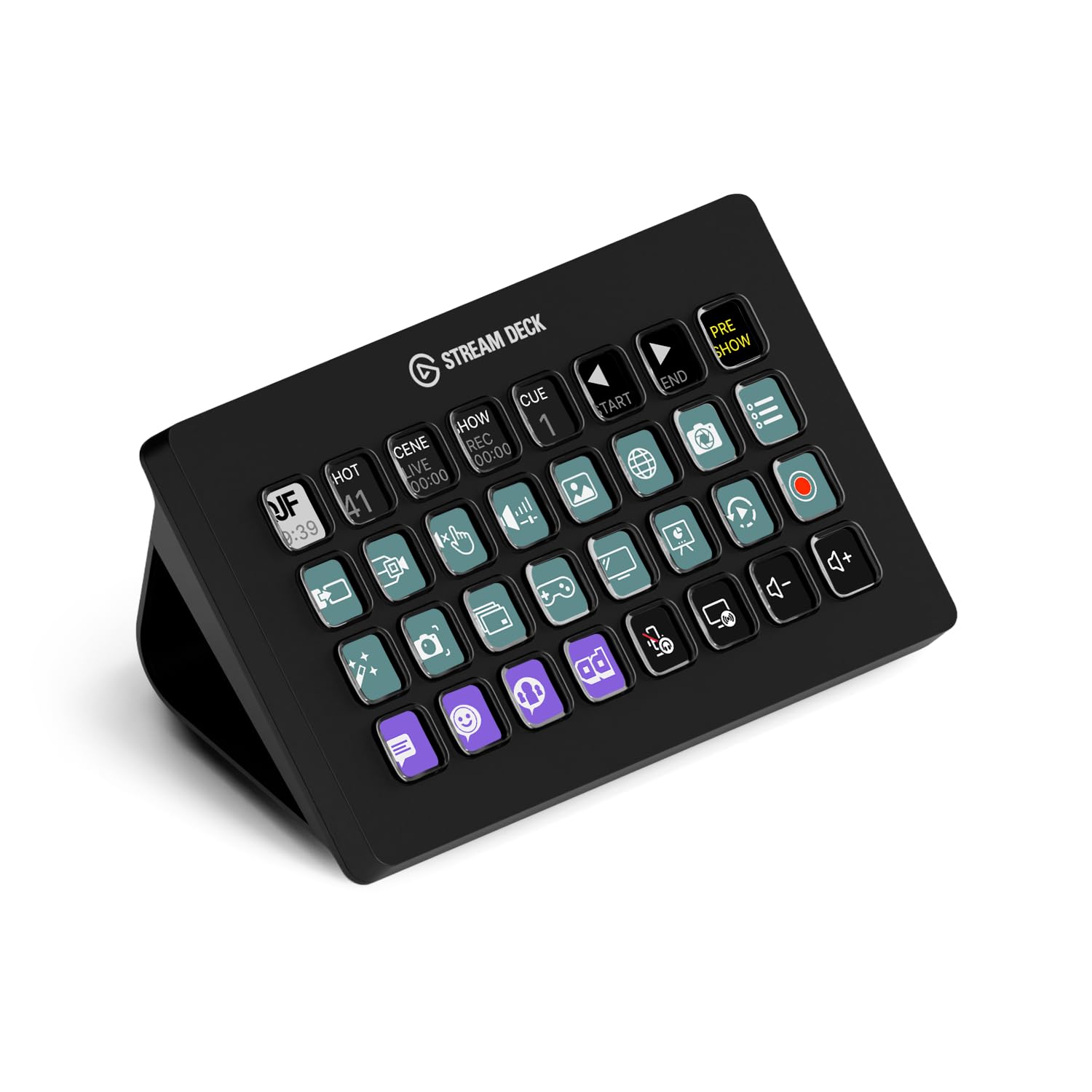
🎥 Elevate your streaming game — because your audience deserves the best!
The Elgato Stream Deck XL is a professional-grade live production controller featuring 32 customizable LCD keys, USB 3.0 connectivity, and broad compatibility with popular streaming and content creation platforms. Designed for Mac and PC, it streamlines complex workflows with instant visual feedback and powerful integrations, making it the ultimate tool for creators who demand precision and speed.


| ASIN | B07RL8H55Z |
| Batteries | Lithium Ion batteries required. |
| Best Sellers Rank | #413 in Video Games ( See Top 100 in Video Games ) #40 in PC Gaming Keyboards |
| Customer Reviews | 4.8 4.8 out of 5 stars (8,242) |
| Date First Available | May 25, 2019 |
| Item Weight | 14.5 ounces |
| Item model number | 10GAT9901 |
| Language | English |
| Manufacturer | Elgato |
| Product Dimensions | 1.34 x 7.17 x 4.41 inches |
E**Y
Very comfortable and easy to use.
Perfect for streaming. Easy to set up, highly customizable, and boosts workflow instantly. Excellent quality and performance.
E**O
Accompanying software makes the deal worthwhile!
This turned out to be MUCH more useful than I expected. Initially it seemed a bit pricey, but the software is extremely slick and makes the keypad worth the extra $$$! I was able to start making my own button shortcuts (and icons) in just a few minutes. It's also very easy to modify or add functions, mostly just drag and drop. Also I like the fact that you can set up the Stream Deck without signing up for yet another account requiring an email address. There is a "marketplace" but it's optional and not required to use and customize the product.
K**S
Quality Piece of Equipment
I myself am a cinematographer and editor (Blah blah blah cameras and movies and stuff) and I purchased this Stream Deck (XL) to improve my productivity while I do my editing. This beats any Macro keyboard or custom keybind kind of thing you could get out there. You can label the LCD buttons with text in the program, as well as put a background image (You can upload your own, or there is an open plugin hub where you can get other people's custom stuff) to each key. The keyboard usually links to most of my software and I can use the macro buttons, but if it doesn't, I can set it to press a custom keybind (it also has Function keys as an option all the way from F1 - F24) to do specific tasks like saving a file. PLUGINS Plugins are usually tailored to specific programs. I have a plugin for DaVinci Resolve Studio, VoiceMod, StreamLabs OBS, and a couple of the other things I like to tinker with. The keyboard can have more than one saved layout. I have twenty something versions of the board (Some for sound effects for discord, some for editing and working). There are different plugins for different things. Some plugins are just so you can have more pictures to use on your keys, some plugins are made to work with commonly used software like VoiceMod. So far, There is NOT a plugin made yet to work with Discord, but like I said before, you can always set custom keybinds to toggle mute, push to talk, deafen, and even share screen. FUNCTION The Stream Deck functions in a similar fashion to your PC. If your PC is off, so is your Deck. If your PC is on sleep, so is your Deck. It applies for pretty much anything. LCD keys are bright and combat my extremely heavy studio lighting. I have no trouble seeing each button clearly. HARDWARE This is sturdy in build (It looks cheap in the picture but it is quite heavy and rugged) and works nicely on the desk. The USB to USB-C cord is a thick braided cable, and will last a very long time if handled appropriately. The back end of the stand is detachable so you can lay the Stream Deck flat. There is traction pads both on the back of the tablet and on the bottom of the stand to stick on your desk nicely. You WILL have to rout the wire through the stand which is a hassle for me personally because of my horrendous lack of cable management, but ultimately It's worth the money. SOFTWARE The software is easy to install but can be hard to navigate to new users. YouTube is a reliable resource for tutorials if you've never used a Stream Deck, and If I'm right, I think El Gato has their own set of tutorials, but I may be wrong so take that with a grain of salt. It is easy to learn, and fun to mess with. CONCLUSION Great product. Design is outstanding, and it's mostly user friendly. I would recommend using this only for a PC or a Mac, as I don't think this would be beneficial on other devices. My user experience has been great, and I would recommend this to any editor, gamer, or PC enthusiast as an investment in your capabilities while you work / play.
C**S
Amazingly useful - you don't know what you're missing until you use it
I have not been paid for this review, nobody solicited me to write it, I have no relationship with the manufacturer, and I purchased this at full price after reading about it online. This is one of those products you have never heard of, but when you use it, you immediately wished you'd found it a long time ago. As someone who has multiple monitors in front of my eyeballs all day long, I have dozens of windows/apps open across multiple screens and virtual desktops. I have many productivity and utility apps to help me manage all this information that's always screaming for my attention. The Stream Deck gives me a whole new way to interact with my data. In addition to the myriad of keyboard shortcuts, app launchers, menu bar customizers, trackpad gestures and more that I use all day, this thing lets me access some of my most important workflows (and create new ones) by simply pressing a single key. This isn't just a glorified app launcher (although it's a really good at that too). You can chain together a limitless set of actions across your entire system. The dynamic keys mean I can also re-arrange them, create folders for less used actions, and much more. There are also a few 'plugins' that run right on the keys themselves. A have a digital clock and my current WAN IP address always ticking away right in front of me, at a glance. I've only had this for a day, and already I'm starting to experiment with how best it can work for me. Right now I'm finding the volume controls most immediately useful. I can swap between headset, system audio, mute audio, mute microphone, and more all with a simple press of a button. This is way faster than even some of the best third-party audio management apps I use. Example: on video calls… mute! While I can certainly use the app's mute/unmute feature, I always find that I am switching between apps and windows during calls, and the audio controls are not always immediately available. The built-in keyboard audio-controls for Mac/Windows systems are not always reliable. But now I know exactly how to mute/unmute myself regardless of which virtual desktop, full-screen app, screenshare, etc. that I am using. I can quickly put my headset on and press a button to make it active right away. No more having to hope that the OS does the right thing with my audio, while I have a room full of people watching me explain something for 20 seconds before someone is able to remind me “you’re on mute” … NICE! There are some more cool features, like profiles that are activated when a certain app is being used. That means I can dig down into specific applications and create super-efficient workflows on a per-app basis. I'm hardly an expert with this after just a day, but I see a ton of potential here. It's a bit expensive, but it's also a niche product that will easily justify its cost for certain people... me included.
C**.
Get this for live streaming, easy to use w/Vmix!
LOVE, LOVE, LOVE this thing! I wish I would’ve added this to my sports live stream broadcasts years ago! Easy to use! Works GREAT with Vmix!!!
A**I
Good item, fast delivery! Thank you
C**N
Excelente produto. Chegou em perfeito estado e lacrado na caixa.
A**J
This thing isn't cheap - at all - but is super versatile and useful if you're willing to shell out. I am not a streamer. I bought it for gaming, and to generally set up shortcuts for everything I regularly use on my PC. If you're willing to put in the time and have some patience, this thing will reward. I have 4 profiles set up, multiple folders, and everything is available at a touch of a button. Works flawlessly, and very pretty to compliment - especially once you get some wallpapers up and running. In the games I use it with (Flight Simulator, Elite Dangerous), this has become a key piece of kit, eliminating the need to use the keyboard or remember elaborate joystick buttons. Highly recommend.
X**.
Superb design, quality. At first you may think that 32 buttons is overkill. It is not. I actually have designed profiles with many pages. You need all those buttons. Unlike LogiTech's where the provided cable did not work, Stream Deck provided a proper cable that has the Bandwidth / Speed necessary to drive it The software provided so that you can create your own customization is of excellent design and quality. Very well though out. In contrast LogiTech's crashed every time making it impossible to program it You do need to invest time customizing it (unless you just need it for standard applications like PhotoShop in which case you can buy pre-made profiles). The documentation on how to design the icons could be better. But with some time you can make it do whatever you need it to do Highly recommend it. My unit has the image of the buttons slightly offset to the top and left but it is fairly minor though I wish it was dead-on centred
A**ー
This is by far the best Gadget I have ever purchased. It allows you to automate tasks and perform macro functions at your fingertips. You really need to get this! You will not regret it, I promise.
Trustpilot
2 weeks ago
2 weeks ago