We remain fully operational. Our teams are working around the clock to ensure your deliveries continue safely.

DOWNLOAD THE APP


Copyright © 2025 Desertcart Holdings Limited
DOWNLOAD THE APP
Buy anything from 5,000+ international stores. One checkout price. No surprise fees. Join 2M+ shoppers on Desertcart.
Desertcart purchases this item on your behalf and handles shipping, customs, and support to Cote D' Ivoire.
🔗 Connect, Power, Conquer!
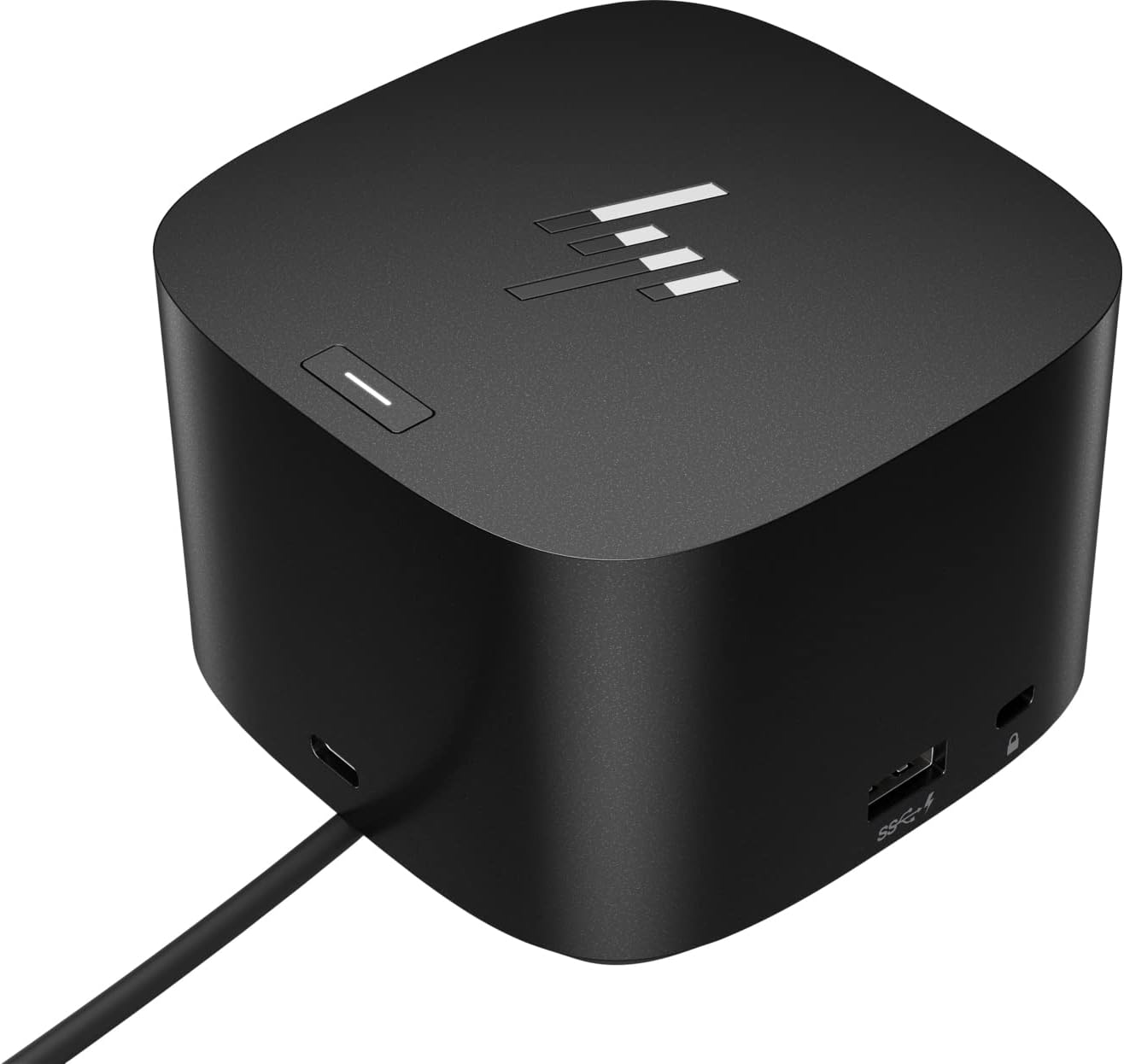
The HP Thunderbolt Dock 280W G4 is a powerful and compact docking solution designed for professionals. With 10 ports including USB, HDMI, and Thunderbolt, it offers extensive connectivity options while delivering 280 watts of power to keep your devices charged and ready. Weighing just 3 pounds and measuring 3.9 inches square, it’s perfect for any workspace.
| ASIN | B0B619S53K |
| Best Sellers Rank | #4,104 in Computers & Accessories ( See Top 100 in Computers & Accessories ) #356 in Laptop Docking Stations |
| Brand | HP |
| Built-In Media | Power Cord, Power Supply, Thunderbolt Dock 280W G4 with Combo Cable, Warranty |
| Color | Black |
| Compatible Devices | Notebook, Desktop PC |
| Customer Reviews | 3.5 out of 5 stars 76 Reviews |
| Global Trade Identification Number | 00196068757434 |
| Hardware Interface | Thunderbolt 4 |
| Item Dimensions L x W x H | 10.5"L x 6"W x 6"H |
| Item Type Name | Docking Station |
| Manufacturer | Hewlett Packard |
| Number of Ports | 9 |
| Product Dimensions | 10.5"L x 6"W x 6"H |
| Total Number of HDMI Ports | 1 |
| Total USB Ports | 5 |
| Total Usb Ports | 5 |
| UPC | 196068757434 196068757946 196068757939 |
| Unit Count | 1.0 Count |
| Warranty Description | 1 year Manufacturer |
| Wattage | 280 |
D**S
Powerful and Versatile Dock – Perfect for HP and More
This HP Thunderbolt Dock 280W G4 works perfectly with our HP laptops, especially Z-Books that need dual power, but it can also work with other brands. It easily powers two monitors and multiple peripherals with no issues. The dock has plenty of useful ports: Front: USB-C for accessories Sides: Two USB ports for charging plus a Kensington lock slot Back: Four USB ports, HDMI, two DisplayPorts, Ethernet (1Gb/2.5Gb), USB-C alt mode, and a Thunderbolt 4 port Top: Power button to wake or start your laptop Everything connects cleanly, the power delivery is strong, and it keeps your workspace organized. Highly recommend if you need reliability, speed, and plenty of ports.
W**T
Overpriced JUNK
So I purchased this after wasting an hour of my life talking to the outsourced sales guy at HP, he barely spoke English so I knew it was going to be a rough start. So he told me this would be the product I needed for my HP Victus. So I checked Amazon and the product was over 100 bucks cheaper here. So I bought it. Now for the review: Pros: Lots of ports. Small Foot print. Easy to set up. Cons: Trashes the performance of your laptop. Internet speed was almost half of what it was through the network port directly on the laptop. Majors programs lag and Windows itself runs like garbage. Disconnected the dock and everything runs perfectly again. The firmware and drivers are so intensive that the device degrades the performance of the laptop by a huge margin. If you need performance in any shape, do not get this dock. Your laptop will slow dramatically.
Y**P
Works great
These G4's 280W work on everything I throw at it. Not the cheapest but highly reliable. Been buying many dozens for my company and they never let us down.
M**.
Nice for normal - graphics too slow for gaming
Nice piece of hardware, however, graphics are too slow for gaming on an HP Victus i7 gaming laptop. You get a lag message concerning the graphics playing games like AOE IV.
J**K
Secondary Monitor Keeps cutting out
This my second G4 purchase. My Samsung monitor kept disconnecting (no signal detected). After hours with my tech support, I replaced the G4 ((and replaced the monitor). The new one arrived but the signal detection did not improve. I had issues with the WIN 10 workstation differentiating between the two HP monitors. I was able to work through that but the second HP monitor would drop the signal for 5 - 10 seconds, then come back. Yesterday I replaced the temporary HP with a new Samsung (one Samsung, one HP now), and the NEW Samsung loses its signal for 5 - 10 seconds every 15 - 20 minutes. NOT happy! I do like the versatility of the G4 but the video defect is very irritating. I feel like I threw good money down the sewer.
G**R
Works well
Had to update drivers and firmware. Finally stopped acting buggy and keeps all monitors synched properly. Now overloaded with dongles, wigglers, drives, monitors, and hot swap computers and it works just fine.
M**.
Warranty's already ticking before you even purchase.
Caveat emptor. HP apparently does not manage their own Amazon storefront and they're selling things that have already been registered or where the warranty has already started prior to purchase. I bought this item from them and registered it on HP's support portal only to discover it was already 10 months in on its 12 month factory warranty. After 2 days of trying to get a hold of someone (phone support is impossible with a horrifically bad IVR), Chat fobbed me off with "come back with the original HP Order number". That's a warranty you might want if you don't spring for the Asurion add-on package, since the last one of this exact model I bought six months ago suddenly died. It was from a third party vendor and apparently for the UK or something else since the serial number wasn't recognized anywhere, so I guess that's just the order of the day.
P**S
Update The Drivers!
Out of the box, everything worked fine except my dual monitors. The monitor behavior was extremely buggy, often cut out, and required numerous power cycles to limp along. I took the advice of other reviewers and updated the drivers for the dock and that has corrected the problem, at least for now. (I hope it stays fixed.) A dock this expensive should NOT be this finicky.
Trustpilot
2 weeks ago
3 days ago